Audit Log Settings
Configuration for guild audit log messages.
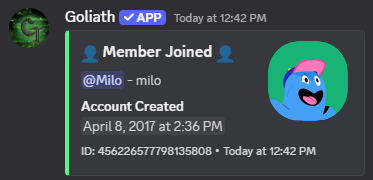
/auditlogsettings memberupdates
You can have a message be sent to the Audit Member Updates Channel when a member joins/leaves the server, changes their nickname, or changes their server avatar, this is disabled by default and gets enabled when a channel is selected.
Green is shown for joins, red is shown when a member leaves.
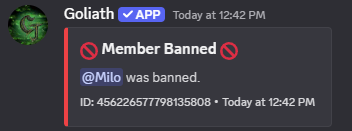
/auditlogsettings punishments
You can have a message be sent to the Audit Punishments Channel when a member is punished, this is disabled by default and gets enabled when a channel is selected.
Green is shown when a member is unbanned or had their timeout removed and red is shown when a member is banned or is timed out.
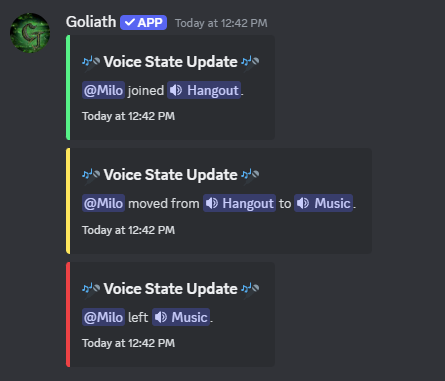
/auditlogsettings voicestates
You can enable or disable the audit log for Voice State changes, this is disabled by default and gets enabled when a channel is selected.
A message is sent to the Audit Voice State Channel when a user joins or leaves a voice channel or when they move between channels.
Green is shown for joins, red is shown for leaves, and yellow is shown for moves.